How to Reduce Noise in Your Home Studio Recordings
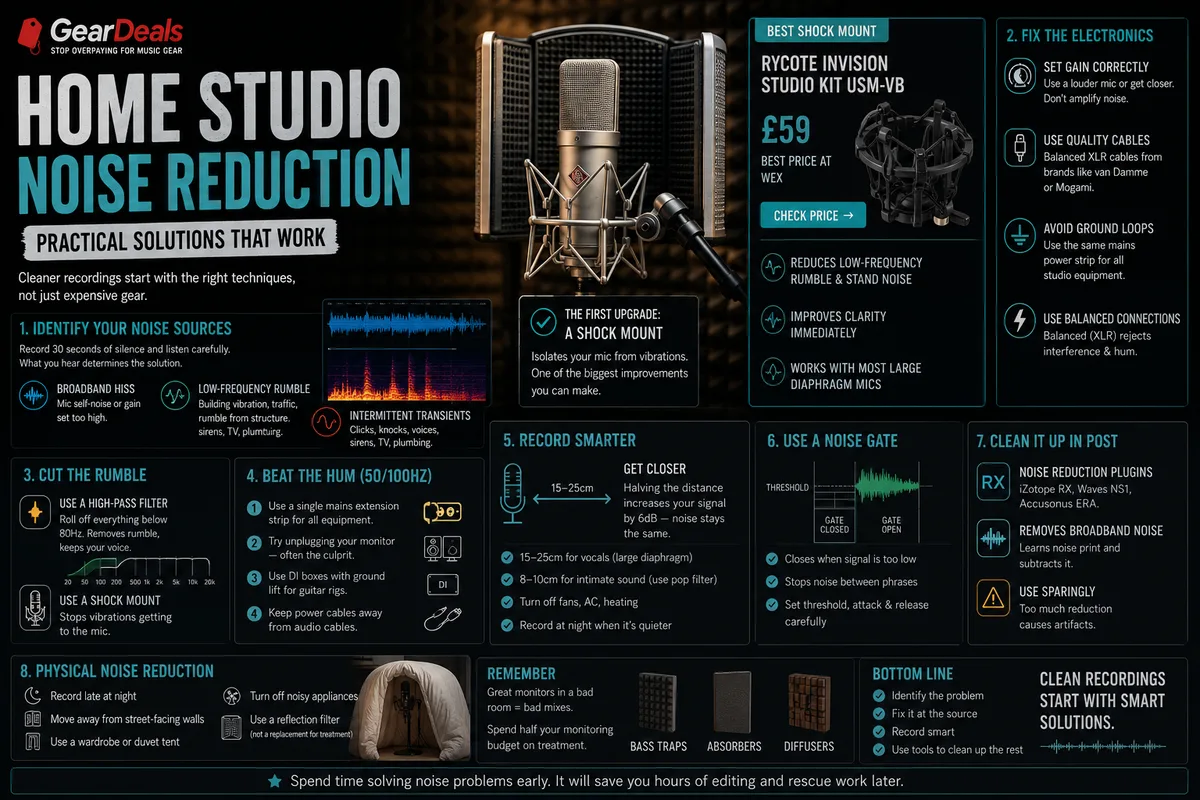
Background noise is the single most common problem in home recordings. These practical techniques will clean up your recordings without requiring expensive soundproofing.
Nothing undermines a home recording faster than audible background noise: the hum of a computer fan, the rumble of traffic outside, a neighbour's television, the central heating ticking. Professional recording studios are acoustically isolated specifically to eliminate these problems, but most home studios are bedrooms, spare rooms or living spaces that weren't designed with recording in mind.
The good news is that a significant proportion of noise problems can be addressed with technique and low-cost solutions before you spend a penny on acoustic treatment or equipment upgrades. This guide covers the most effective approaches in roughly the order you should try them.
Identify your noise sources first
Before treating any problem, understand what you're dealing with. Put your DAW in record mode, step away from the microphone, and let it record silence for 30 seconds. Then zoom in on the waveform and listen carefully on headphones. You'll typically find:
- Broadband hiss - Usually from your microphone's self-noise or from the preamp gain being set too high. This is an electronic noise floor.
- Low-frequency rumble - Typically building vibration (traffic, underground trains, building services), transmitted through the floor and stand into the microphone.
- Intermittent transients - Specific events: heating clicks, plumbing, external voices, distant sirens.
- Constant tonal hum - Usually 50Hz or 100Hz (electrical interference from mains power or ground loops between equipment).
Each type has different causes and different solutions.
Dealing with electronic noise floor
If you're hearing broadband hiss that increases when you turn up the mic gain, the issue is in your signal chain. Common causes:
- Gain set too high on your interface - if the signal clips or you're running very high gain to compensate for a quiet mic, you're amplifying noise as well as signal. Use a louder microphone or get closer to it.
- Poor quality cables - electromagnetic interference picked up by unshielded or poorly shielded cables. Replace with quality balanced XLR cables from brands like van Damme or Mogami.
- Ground loop - a hum caused by electrical interference when multiple pieces of equipment are connected to different mains sockets. Try using the same mains extension for all studio equipment. A proper ground lift adapter can help but consult an electrician for permanent solutions.
Dealing with low-frequency rumble
Vibration transmitted through the stand is one of the most common noise sources in home studios. The fix is a shock mount:
A shock mount suspends your microphone in elastic bands or springs, isolating it from stand vibrations. The improvement for low-frequency rumble from footsteps and building vibration is immediate and significant. If you're not using a shock mount on a condenser microphone, add one before spending money on anything else.
Also use a high-pass filter (often called a low-cut filter) on your microphone or interface. Rolling off frequencies below 80Hz removes most building rumble without affecting the warmth of a voice. Most audio interfaces and DAW plugins include this as a standard feature.
Dealing with ground loops (50Hz/100Hz hum)
If you hear a constant hum at a fixed pitch (usually 50Hz or 100Hz), you likely have a ground loop. This occurs when electrical current flows through the ground connections between different pieces of equipment. Solutions:
- Use a single mains extension strip for all studio equipment - this ensures everything shares the same ground point
- Use balanced connections (XLR) rather than unbalanced (TS/RCA) wherever possible - balanced cables reject common-mode noise including ground loop interference
- If you're using a computer with a monitor, the monitor's power supply is often the culprit - try unplugging it temporarily to test
- DI boxes with ground lift switches can resolve persistent ground loops in guitar rigs
Recording technique: the most underrated noise-reduction tool
Simply getting closer to your microphone dramatically improves your signal-to-noise ratio. Halving the distance from mic to source doubles the signal level (6dB increase), while the background noise level stays the same. This means you can turn down the gain on your interface, which reduces amplified noise.
For vocal recording, 15-25cm from a large-diaphragm condenser is standard. Some vocalists record much closer (8-10cm) with a pop filter for an even more intimate, noise-free sound. Experiment with distance and you'll often find that simply moving closer solves problems that no amount of acoustic treatment would fix.
The noise gate
A noise gate is a plugin (or hardware unit) that silences the signal when it falls below a threshold. Between vocal phrases, when you're not speaking or singing, the gate closes and prevents the noise floor from being audible. It re-opens when the signal gets louder than the threshold.
Used well, a noise gate is an effective tool for cleaning up vocals and spoken word recordings. Used badly (with the threshold set too high or too slow an attack), it cuts the beginning of words and sounds unnatural. Most DAWs include a noise gate plugin - experiment carefully with the threshold, attack and release settings.
Noise reduction plugins
Tools like iZotope RX, Waves NS1 and Accusonus ERA Noise Remover can remove broadband noise from recordings after the fact using spectral analysis. They work by learning the "noise print" of the background noise in a section of silence and then subtracting it from the full recording.
These tools are genuinely useful for rescuing recordings from unavoidable noise situations, but they introduce artefacts at high reduction settings (a characteristic "underwater" or "metallic" quality). They're a repair tool, not a substitute for good recording practice.
Physical noise reduction
The most reliable noise reduction is physical separation from noise sources:
- Record late at night when ambient noise is lower - road traffic, neighbouring activity, building services all reduce significantly after midnight
- Turn off all fans, air conditioning and central heating during recording sessions
- Move your recording position to the interior of the building, away from street-facing walls
- Record vocals in a walk-in wardrobe or inside a tent covered with duvets - sounds odd, works genuinely well
- Use a reflection filter (a curved absorber screen that mounts on the mic stand behind the mic) to reduce room reflections without treating the whole space