Price updated 23 Apr 2026, 16:00
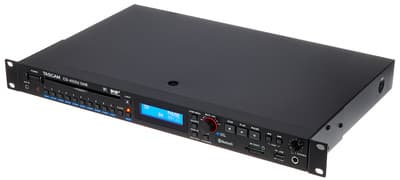
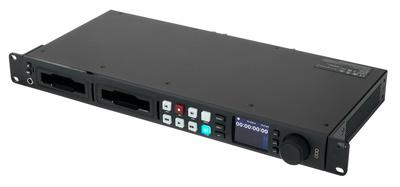
Blackmagic Design HyperDeck Studio HD Pro
Best available price
£868.00
1 store comparedSee all offers ↓
Only available at Thomann
Free shipping available on the cheapest offer
Fair Price· Near 90-day average
90d Low
£868.00
Best seen
90d High
£869.00
Worst seen
90d Average
£868.50
Baseline
30d Forecast
—
→ Stable
Price History
Avg priceMin–Max band
Fair Price· Near 90-day average
Stores:
Deep Intelligence Analysis
RSI · Bollinger Bands · Buy/Sell Signal · News
Compare offers
| Store | Price | Shipping | Total | Condition | Stock | |
|---|---|---|---|---|---|---|
| BestThomann | £868.00 | Free | £868.00 | New | — | Buy now |
Product Description
- Blackmagic Design HyperDeck Studio HD Pro
- Broadcast Deck
- For recording and playback of H.264 files up to 1080p/60 and ProRes or DNxHD files in SD/HD formats up to 2160p/30 on SD/UHS-II cards or external USB drives
- Offers all the features of the Plus model plus two SSD slots in addition to the two SD card slots of the smaller models
- 6G-SDI inputs and outputs
- HDMI input and output
- Dual SD card slots allow card swapping while recording is in progress
- Integrated clock and time code generators
- High-quality controls on the front panel
- Functions as a webcam when connected to a computer via the USB port
- Can be used with any video software
- 1 SDI video input
- 2 SDI video outputs
- 1 SDI monitor output
- SDI rates: 270 Mbit
- 1.5 G
- 3 G
- 6 G
- 1 HDMI 2.0 video input
- 1 HDMI 2.0 video output
- Time code connections: 1 XLR input
- 1 XLR output
- Reference connections: 1 BNC input
- 1 BNC output
- Tri-sync or black burst
- SDI audio inputs and outputs: 16 embedded audio channels
- HDMI audio outputs: 8 embedded audio channels
- Remote control: 1 RS-422 input
- 1 RS-422 output
- Computer interface: 1 USB-C-3.0 (up to 5 Gb/s) for recording to external drives, webcam output, software configuration and updates
- Video sampling frequency: 4:2:2 YUV
- Colour accuracy: 10 bit
- Colour spaces: Rec. 601
- Rec. 709
- Rec. 2020
- 33-point 3D LUTs can be applied to the SDI monitor output
- HDR support: Hybrid Log-Gamma
- ST2084 300
- ST2084 500
- ST2084 800
- ST2084 1000
- ST2084 2000
- ST2084 4000
- ST2084
- Multirate support: Automatic detection of SD
- HD and 6G-SDI
- Media: 2x 2.5-inch drive bays
- 2 SD card bays
- 1 USB-C 3.0. expansion port for external recording in SD
- HD
- 2K DCI
- Ultra HD and 4K DCI
- Media type: SATA-II or SATA-III 2.5-inch solid-state media UHS-I and UHS-II SD cards
- Storage media format: formats media in ExFAT (Windows/Mac) or HFS+ (Mac) file systems
- Supported codecs: ProRes HQ QuickTime
- ProRes 422 QuickTime
- ProRes LT QuickTime
- ProRes Proxy QuickTime in all formats up to 2160p/30 Playback in ProRes 4444 QuickTime only up to 1080p/60.
- Automatic distribution of fill-and-key signals via SDI outputs A and B DNxHD 220x
- DNxHD 220x MXF
- DNxHD 145
- DNxHD 145 MXF
- DNxHD 45
- DNxHD 45 MXF in 720p and 1080p HD formats up to 60 fps DNxHR HQX
- DNxHR HQX MXF
- DNxHR SQ
- DNxHR SQ MXF
- DNxHR LB
- DNxHR LB MXF in 2K-DCI and 2160p formats up to 30 fps H.264 SDI 4:2:2 10 bit
- H.264 High 4:2:0 8-bit
- H.264 Medium 4:2:0 8-bit
- H.264 Low 4:2:0 8-bit in all progressive formats up to 1080p/60
- Integrated control panel with 16 buttons
- Seeker with electronic clutch and 2.2-inch colour display for transport and unit control
- External control: RS-422 deck control
- SDI start/stop, timecode run
- Blackmagic HyperDeck Ethernet Protocol included Supports remote file uploads via FTP
- Software included: Blackmagic OS
- Blackmagic HyperDeck Setup
- Product software upgrades loaded at start-up or via Blackmagic
- HyperDeck Setup via USB port
- Compatible operating systems: Mac Catalina 10.15
- Mac Big Sur 11.1 or higher
- Windows 10
- 64-bit
- 1 Built-in AC power supply for 100 240 V
- 50/60 Hz
- 1 Four-pin XLR socket for external 12V DC power supply or battery charging (mains cable not included)
- Dimensions: 482 x 236.4 x 44.2 mm (1 height unit)
- Weight: 2.11 kg@+*Note:* Copy-protected HDMI sources cannot be recorded via the HDMI input. Always inform yourself about copyright before recording or distributing content.@+@+